
Ready-made AI agents for business with proven results
Vera — finance and accounting assistant
Vera is an AI agent: an assistant with a ready-made profession. Invoices and completion certificates in 1C (accounting software), payments queued for your approval, customer debts and the tax calendar. She shows you ahead of time where cash may run short.
A trading company with 60 suppliers: in one month Vera reconciled 412 invoices and completion certificates against the bank statement, found 23 discrepancies totaling $2,260 and saved the accountant 38 hours of manual work.
- An invoice from a single voice message: Vera draws it up in 1C herself, so you never have to open it.She calculates the taxes herself. Forecast: will you have enough cash in 30, 60 and 90 days?
from $189 per month per agent · payments and signatures only through a person
 Agent card

AI agent
Vera · Accounting and finance
- Schedule
- 7 days a week
- Autonomy
- levels 1–4, you decide
- Plan
- from $189 per month per agent
What Vera does
Cash forecast, invoices, debts and deadlines, with no surprises
Vera runs the money routine of your accounting and tells you in advance what will become a problem a month from now. Reconciliations and reminders run on their own; people keep the decisions.
Cash forecast and payments
Shows how much cash you'll have a month from now.
- Forecast: will you have enough cash in 30, 60 and 90 daysmoney in, money out, taxes, and the risk of a cash gap
- Payment list for the weeka draft for your approval; you send the payment yourself
- Where money leaksbank fees, recurring charges and spending with an unclear purpose
Invoices and documents: 1C and SBIS
Source documents, invoices and completion certificates go into 1C, numbered correctly and in sequence. Every invoice goes through 1C, so nothing gets lost.
- Invoice and certificate from the correspondence and the contractcompany details are pulled from your database
- Electronic document exchange in SBISincoming documents checked against 1C, outgoing ones ready to sign
- Document recognitionsupplier invoices and certificates land in 1C
- Reconciliation statement with a counterpartyon request, as a finished document
Customer debts
Works through unpaid invoices by days overdue, politely and in order.
- Debts by age at a glancewho owes, how much and for how many days
- Reminder ladderfrom a gentle email to a firm one, then a handover to a person
- Bank-to-1C reconciliationevery payment matched to an invoice, duplicates and unidentified payments found, the month closed
Deadlines and taxes
Keeps the calendar of deadlines and works out the amounts in advance.
- Tax calendarwhat to pay and file, and when, for sole proprietors and LLCs
- Quarterly forms and single tax account reconciliationdrafts ready by the deadline
- Reply to a tax office requesta draft with references to the documents; a person signs it
Before and after
What changes in your work
A real example: how it was before the agent and how it is now.
Invoices, certificates and deadlines are tracked by hand. A cash gap shows up when it's already too late.
An invoice from a single voice message, without opening 1C. Forecast: will you have enough cash in 30, 60 and 90 days?

What arrives in the morning
Your money on one page, by nine in the morning
Balances and incoming payments
How much is in your accounts and what came in yesterday, from the bank and 1C, with every payment matched to an invoice.
Who hasn't paid
- List of debts by days overdue
- Who gets a reminder today, gentle or firm
- Who it's time to hand over to you for a call
What's ahead
- This week's payments: a list for your approval
- The next tax deadline and the amount due
- Whether the cash will last until the end of the month
What you need to decide
Approve the payment list, or postpone one payment if a cash gap is ahead.
This sample shows what the summary contains. The amounts in yours come only from your bank and 1C.
Sample request
An invoice and certificate in 1C, without posting or sending
Vera prepares the documents in 1C but doesn't post them or send them.
Request
Issue Sever LLC an invoice and a completion certificate for September under contract No. 48.
Agent's reply
The invoice and completion certificate under the contract for the month are in 1C, as PDF and Word. Saved without posting, signing or sending. Contract No. 48: 1 month × $582, no VAT.
Time
About 30 minutes
Sample scenario: the companies and data are fictional, the working time is real.
Sample tasks
This is what Vera's work looks like
The request, the result and the time, all in one window. Sample scenarios: the data is fictional, the working time is real.
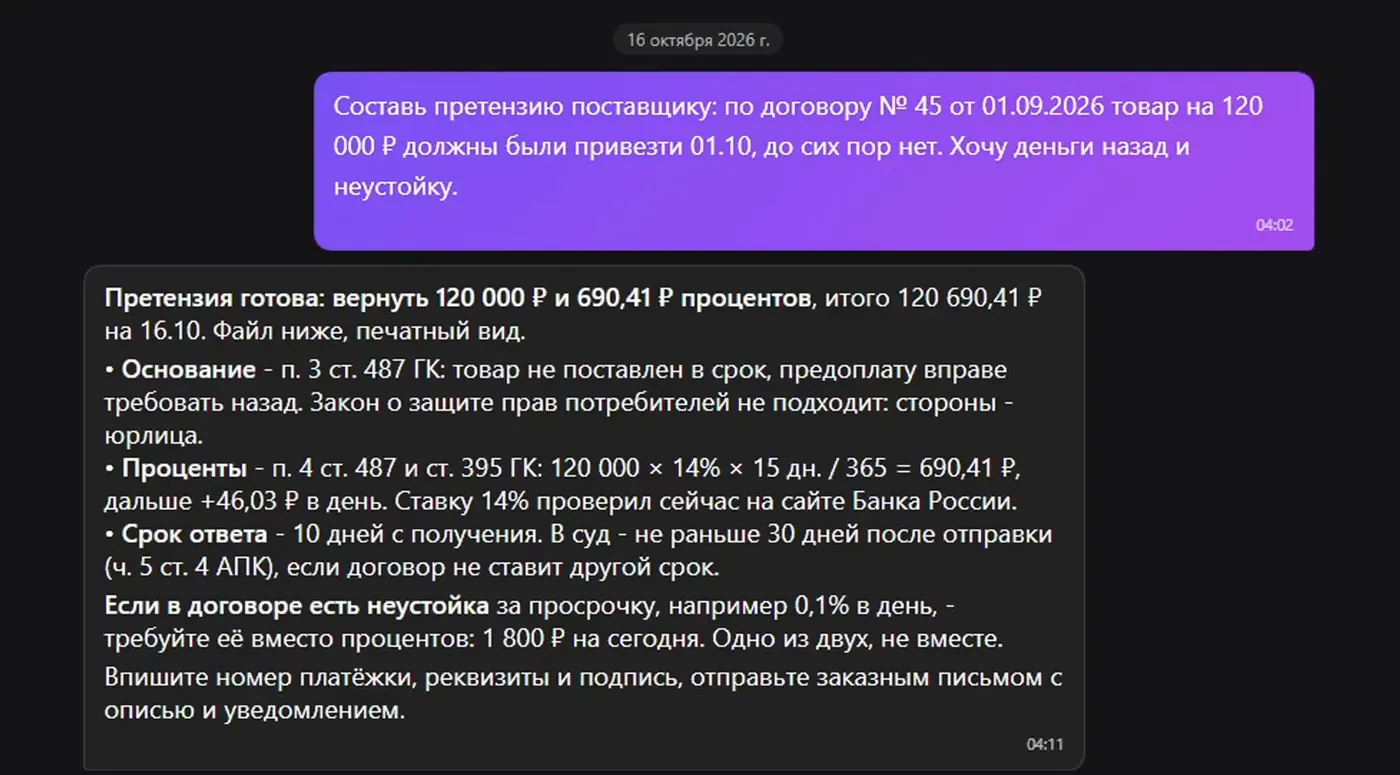
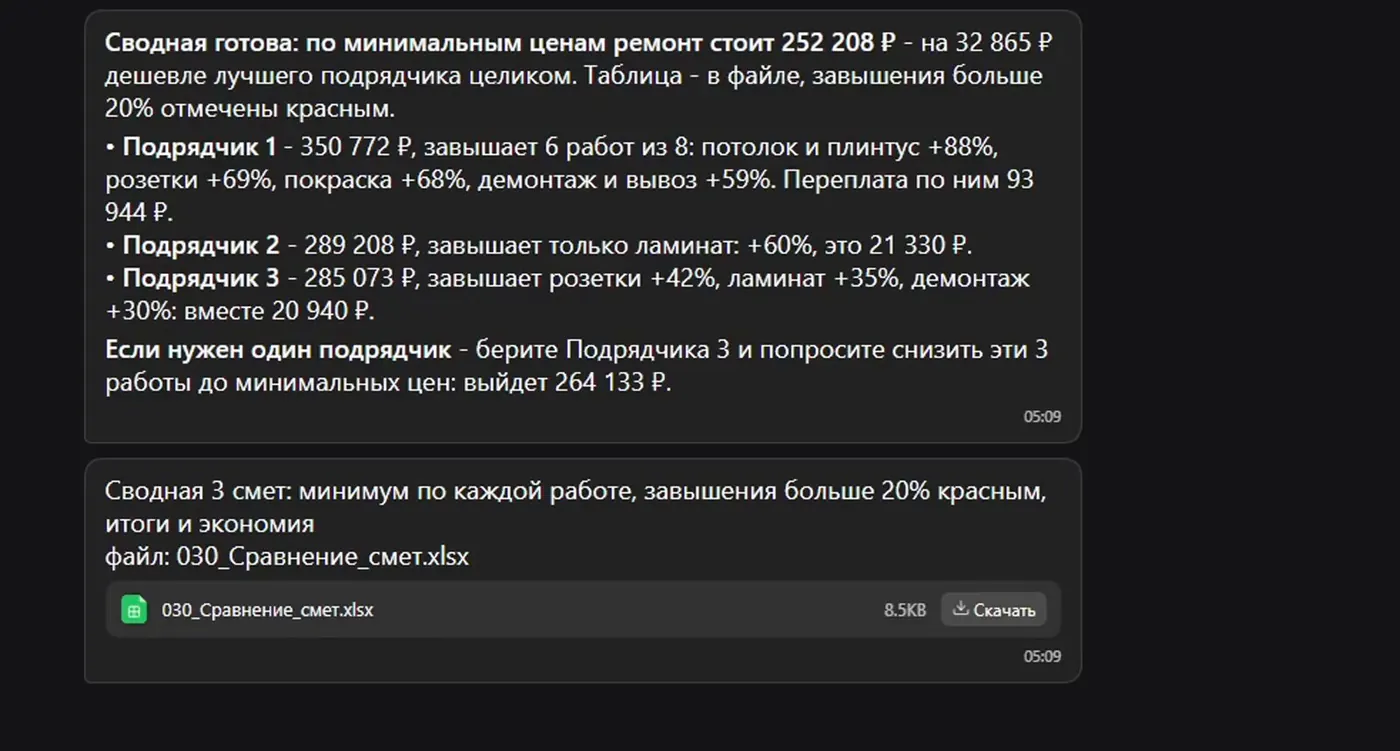
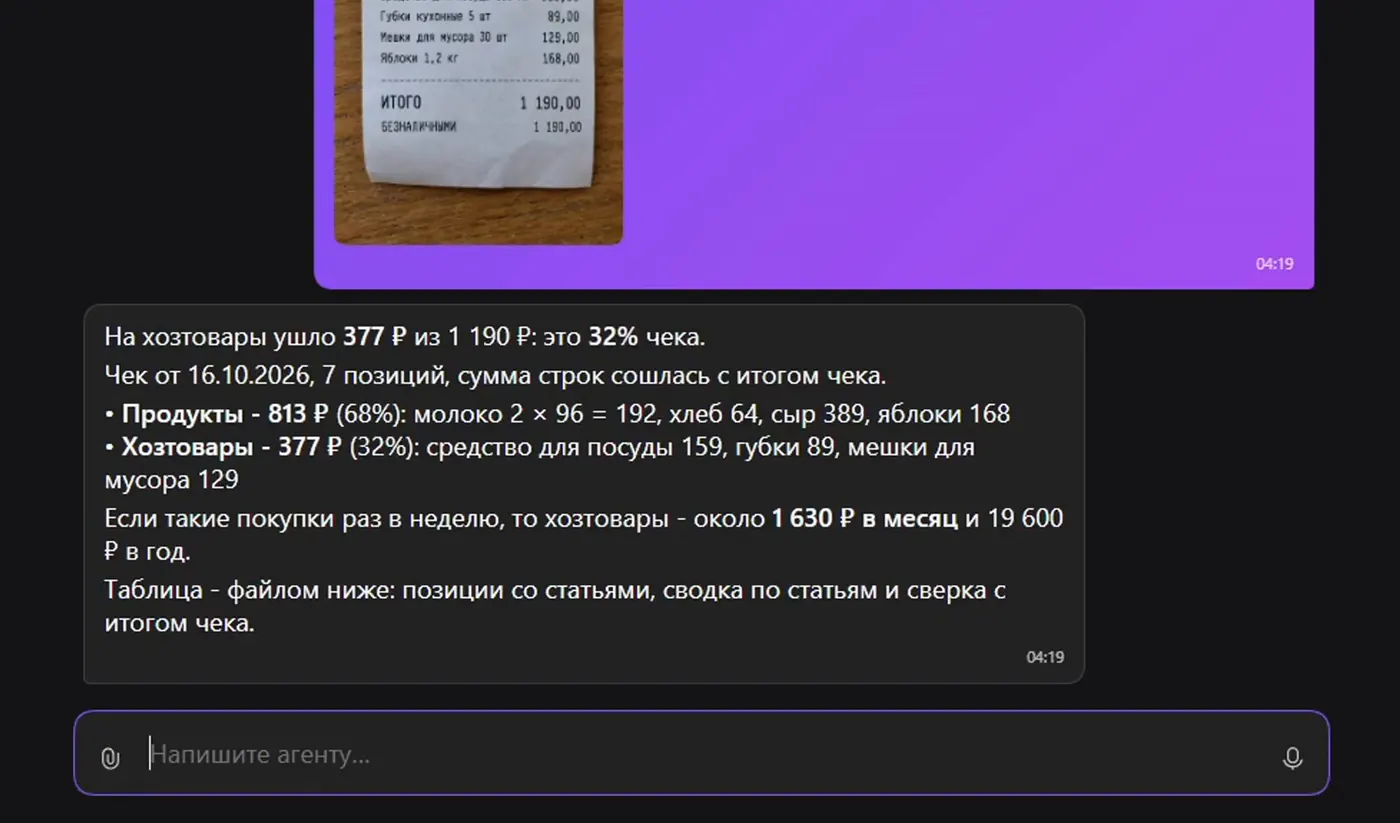
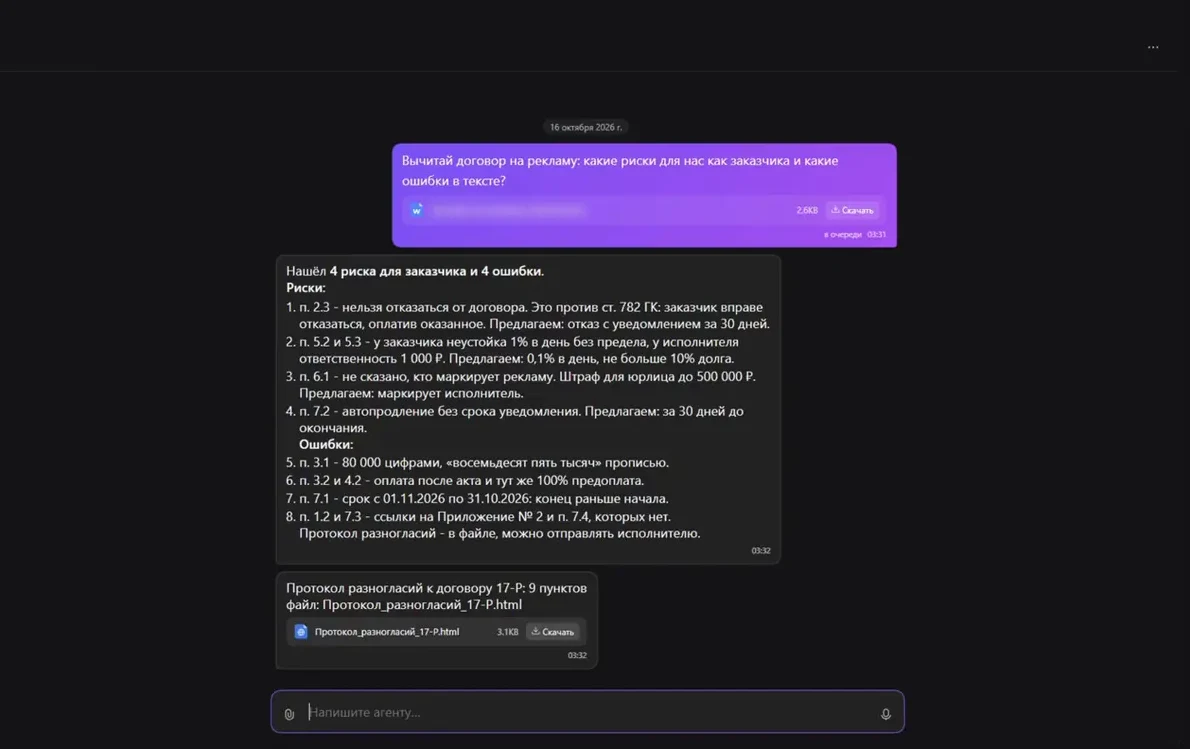
What changes with Vera: before and after
Deadlines, debts and cash gaps: before and after
Deadlines
BeforeNobody thinks about the tax payment and the report until the last week.
AfterA calendar of deadlines with the amounts known in advance, and a draft form ready by the due date.
Customer debts
BeforeDebtors get a reminder when someone finds the time, and overdue amounts grow quietly.
AfterEvery debt is visible by days overdue, and reminders go out every day, step by step up the ladder.
Cash gaps
BeforeThe gap shows up on the day the payment is due.
AfterThe 30-, 60- and 90-day forecast shows it in advance: there's time to move a payment or speed up collection.
Invoices
BeforeSome invoices live in email and spreadsheets and never reach the books.
AfterEvery invoice goes through 1C, and the bank is reconciled against the invoices.
We don't publish our clients' amounts: revenue, debts and payments stay with the clients. You'll see your own numbers on your own data once you're connected.

- 1C
- SBIS
- Electronic document exchange
- Online banking: statements
- Tax calendar
- Google Sheets
- Telegram
- Calendar
- Bitrix24
- amoCRM
- Other accounting software: connected on request
Boundaries
What Vera never does
Rules that don't change at any autonomy level or at any workload.
Doesn't send payments
Only a draft payment list for your approval. You make the payment yourself, in your bank.
Doesn't sign
Outgoing documents, replies to the tax office and signatures are left to a person.
Doesn't fudge the numbers
If a statement or a document is missing, she says so. She shows you every discrepancy.
Doesn't take data outside
Work under Federal Law 152-FZ, role-based access, every action recorded in the activity log.
How to work with her
Write wherever it suits you, and she replies right there
By voice, text or file. Vera is the same in all four places, and there's nothing to learn.
Desktop app
Summaries, spreadsheets and documents on a big screen, tasks in a single window.
Mobile app
The morning summary and approvals from your phone, a task by voice on the go.
Telegram
A work chat, like with a colleague: voice messages, text, files and forwarded emails.
Browser
From any computer, with nothing to install. If a program has no direct integration, Vera works in it through the browser, the way a person would.
Autonomy
How much freedom Vera gets is up to you
Four levels. She never acts above the one you've chosen, and you change the level with a single phrase in the chat. We always start with the first.
Level 1
Advisor
Watches and suggests. Reads your systems and brings a briefing every morning: what's urgent and what she would do about it. You press the buttons.
For example: she finds unpaid invoices and sends you a list of debtors. You decide who gets a reminder.
Level 2
Assistant
She prepares, you say “yes.” She puts the whole job together: an invoice, a certificate, a payment list, a letter to a debtor. Nothing goes out until you confirm.
For example: a customer invoice is ready in 1C, and it goes out only on your “yes.”
Level 3
Executor
Acts within your limits. Does what you've allowed on his own, within set amounts, deadlines and recipients. Anything beyond the limits is a question for you.
For example: she sends debtors reminders up the ladder herself, within the rules you set.
Level 4
Full management
Runs the whole area and reports back. One command puts all her actions on pause.
For example: invoices, reminders and the cash summary run without you; you read the morning summary.
Pricing
How much Vera costs
The agent works every day, and you pay for a month of his work. He is trained for your business and works in your own tools.
Daily work
from $189 /mo
All features, base workload. One agent on the daily money routine: invoices in 1C, debts, reminders, tax deadlines.
- Invoices and certificates through 1C
- Customer debts and reminders
- Tax calendar
Pro agent
$549 /mo
Same features, 5× the workload: up to three users.
- Payment list and cash forecast
- Bank-to-1C reconciliation, month-end close
- Up to 3 users
For the company
$919 /mo
Same features, 20× the workload: an agent for everyone on the team, and a combined summary for the manager.
- An agent for every employee
- Several 1C databases and payment approval rules: who confirms and up to what amount
- Activity log for the whole team
A company-wide rollout is priced by custom quote: how a rollout works. All plans are on the Pricing page.
FAQ
Frequently asked questions
Didn't find yours? See all questions or ask in your request.
How much does Vera cost?
From $189 per month for the day-to-day money routine. The Pro agent plan for up to three users is $549. An agent for every employee in the company is $919. A company-wide rollout is priced by custom quote.
Can Vera make a payment or sign a document herself?
No. Payments, signatures and sending documents outside the company always go through a person. Vera prepares the draft; the decision is yours.
Does she work with SBIS and electronic document exchange?
Yes. Vera checks incoming documents from SBIS against 1C and gets outgoing ones ready for signature. Signing and sending them out is up to a person.
Which systems does she work with?
With 1C: documents, reference data and settlements with counterparties. Also with SBIS, bank statements, email, spreadsheets and your calendar. If a program has no direct integration, Vera works in it through the browser, the way a person would. A customer invoice is issued only through 1C, so it always lands in your books.
Will she replace my accountant?
No. Vera takes the routine off the accountant and the owner: source documents, reconciliations, reminders to debtors, the calendar of deadlines. Decisions stay with the accountant, and a person signs and files the reports.
How is financial data protected?
We work under Federal Law 152-FZ (Russia's personal data law): data is stored in Russia, access is role-based, and every action is logged. We sign a non-disclosure agreement before the first access is granted.
Do I need to learn AI or bring in developers?
No. You give tasks the way you would to a person: by voice, text, image or video. If something is unclear, the agent asks. We handle the connection to your software.
What do I need to download and update?
The AI models and skills are already built into the agent: there is nothing to download or update. The app is optional. We test new releases ourselves, and they reach your agent ready to use.
Which AI model does Vera run on?
All of the world's leading AI models. Vera picks the right one for each task herself. When a better model comes out, your agent has it the next day.
Request
Get an agent
Leave your name and contact: we'll reply within one business day. After payment, we spend half an hour on your business, and Vera takes on her first task.
- Set up within 24 hours of payment
- First we talk through your task, then payment and setup
- Data is stored in Russia, under Federal Law 152-FZ
Our manager stays in touch with you: connects your tools and answers questions on weekdays 10:00–19:00 Moscow time (UTC+3).
Other agents
A task that falls outside an agent's profession is handed to a colleague.
 Adam
 Eva
 Gleb
 Marta
 Jarvis
 Lev
 Maya